

Simple, Secure, and Smart Banking
Stay connected to your Bank effortlessly, anytime, anywhere!
Download the DCB Mobile Banking App and enjoy instant access to a variety of convenient features and services.
Highlights
- Download account statement.
- Book Fixed Deposit directly from the app & add nominee.
- Positive Pay.
- Biometric login.
- Block/ unblock Debit Card.
- Manage limits and access channels.
- Transfer funds seamlessly using IMPS & NEFT, or send money to multiple accounts in one go from the Multiple Fund Transfer feature.
- Pay utility bills and recharge services.
- Request a new chequebook or stop a cheque payment.
- Update PAN.
- Submit FATCA declaration.
- Download Interest Certificate.
- Change Mobile Banking App PIN.
- Generate PIN for DCB Debit Card.
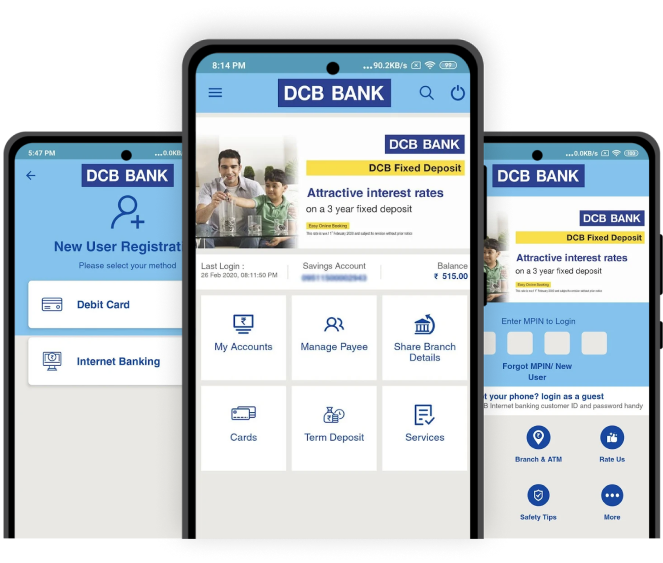
Download App
Download and install the DCB Mobile Banking App from either the Play Store or the App Store. Register on the app using your DCB Debit Card or DCB Internet Banking login credentials (user name & password).
Please scan the QR code and download the DCB Mobile Banking app.



Security Tips
- Ensure that confidential personal information and login/password details are not shared with anyone. Lock your mobile device with a password when not in use.
- Register for SMS alerts to keep track of your banking transactions.
- Prior to parting with your mobile device or sending it for repair or maintenance, remember to clear its browsing history.
- Do not save confidential information such as your debit and credit card numbers, CVV numbers or PINs on your mobile phone.
- Install and regularly update effective mobile anti-malware or anti-virus software on your smartphone to ensure protection against threats.
- Do not enable auto-fill or save user IDs or passwords for mobile banking.
- Never leave your mobile phone unattended.
- Do not use "jailbroken" or "rooted" devices for online banking.
- Download apps only from official app stores like the Apple App Store or Google Play Store.
- Never disclose your personal information or online banking credentials via e-mail or text message, as these can be used for identity theft.
- Log out of online mobile banking or application as soon as you have completed your transactions.
- In case you lose your mobile phone, please call DCB Customer Care at 022 6899 7777 or 040 6815 7777 to deactivate the Mobile Banking app user ID.
Frequently Asked Questions
DCB Mobile Banking App allows you to bank anywhere, anytime, using your mobile phone or tablet. Enjoy instant access to your Savings Account and Current Account, along with features like instant fund transfers, view account transactions, and request new cheque books or stop cheque payments.
Download and install the DCB Mobile Banking App either from the Play Store or App Store. Register on the app using either your DCB Debit Card, DCB Internet Banking login details, or Temporary PIN.
You can instantly register for DCB Mobile Banking App using the DCB Debit Card, DCB Internet Banking, Term Deposit, Gold Loan details or temporary MPIN.
Customers who do not have a DCB Debit Card or DCB Internet Banking login, can submit a signed customer request form to register for DCB Mobile Banking. Please visit any DCB Bank branch to receive assistance. Once the request is processed, the Bank will send a temporary PIN to the registered mobile number and email within 4 to 7 working days.
MPIN is a PIN used to access your DCB Bank account through mobile banking.
You can register yourself again for mobile banking by using ”Forgot MPIN” / ”New User” option on the App. Use your DCB Debit Card or DCB Internet Banking details to create a new MPIN.
Please contact DCB Customer Care, available from 8 am to 8 pm IST (Monday to Saturday). Additionally, DCB Card customers may access 24x7 DCB Customer Care for emergency services. Resident Indians may contact DCB Customer Care at 022-68997777 or 040-68157777, while NRI customers may contact +91 22 61 271000.
Yes, once activated, you can change the MPIN.
- Account Summary.
- Enquiry
- Account Balance.
- Fixed Deposit details.
- Mini Statement (for last 10 transactions).
- Passbook Statement (all transactions in the last 1 month).
- Book Fixed Deposit.
- Manage Payee.
- Fund Transfers
- Within your DCB Bank accounts.
- To other DCB Bank account holders.
- IMPS (using beneficiary account number and IFSC).
- NEFT & RTGS.
- Bill Pay
- Add and delete billers.
- Pay utility bills.
- Cards
- Temporary block and unblock.
- Manage international and domestic transactions.
- Manage Card limit.
- Generate PIN.
- Gold Loan
- Requests
- Cheque Book.
- Stop Cheque.
- Change MPIN.
- ATM and Branch locator.
- Contact us.
DCB Bank Mobile Banking supports the following types of accounts:
- Savings Account.
- Current Account.
- Overdraft Account.
- Cash Credit Account.
- Fixed Deposit (Account Summary, Balance Enquiry & Tracking).
Yes indeed! DCB Bank Mobile Banking gives you much more than mobile alerts. With it, you can send and receive money. It is a whole new way to bank. On the other hand, Mobile Alert is a SMS or text message service where DCB Bank updates you on account activity. These text messages are sent whenever an event occurs in your account.
DCB Bank Mobile Banking is a quick and a convenient alternative to the branch visit. You can carry out basic banking activities directly from your mobile phone or tab. DCB Bank Mobile Banking is compatible with GSM mobile phones and works on GPRS channels.
Great! You will need to have an account with DCB Bank to avail of the service. We will be happy to explain the documents and criteria for you to start banking with us.
DCB Bank Mobile Banking service is currently offered free of cost to DCB Bank customers.
With IMPS, funds can be transferred instantly. Transfer funds to DCB Bank accounts or non-DCB Bank accounts. The IMPS facility is not applicable for NRI customers.
Yes, the per day limit for DCB Bank Mobile Banking fund transfers is INR 5 lakh. DCB Bank Limited, at its sole discretion may increase or decrease the limit.
Yes, you can access this service when you are travelling abroad.
If your mobile number has changed, immediately inform DCB Bank. You will have to submit a mobile phone number update request.
Nicknames make it easy for you to select the relevant beneficiary. Add a nickname to any beneficiary with the link ‘add nickname’. The nickname can be alphanumeric, and special characters can also be used to the extent of 6 characters.
Contact your mobile service provider to confirm that your phone has internet or data service access. Your service provider may charge a fee for the service; ensure that you ask for details on fees and charges.
You can simply login again to DCB Mobile Banking and verify your transaction history to check if the transaction has been successfully executed. If the transaction is not executed, then you may try again.
On most handsets, you can answer the call or read the SMS while Mobile Banking continues to run in the background. After you have finished your call, you can resume banking within the defined period of inactivity.
Please call as soon as you change your mobile number. Your new mobile number should be registered with the Bank to use DCB Mobile Banking App. You can register or update your new mobile number by visiting the nearest DCB Bank branch.
You are permitted 3 attempts to input the MPIN, after which it the access to DCB Mobile Banking app is blocked. This is one of the many security features. Please use the forgot MPIN option to reset the MPIN using your DCB Debit Card or DCB Internet Banking details.
The General Packet Radio Service (GPRS) is a non-voice value added service that allows mobiles or tabs to be used for sending and receiving data over an Internet Protocol (IP) based network. GPRS, is a data bearer that enables wireless access to data networks like the internet, enabling users to access e-mail and other internet applications using mobile phones. GPRS customers enjoy continuous wireless connection to data networks (internet) and access their favourite websites, entertainment services and other web applications.
Follow these steps to report unauthorised DCB Mobile Banking or DCB Internet Banking transactions. Please login to DCB Bank Mobile Banking > Click ‘Transfer’ > ‘Transfer History’ Select the specific transaction/s that you are sure are fraudulent and click ‘Report Fraud’.
Please contact DCB Customer Care at 022-6899 7777 or 040-6815 7777 or email customercare@dcbbank.com
DCB Bank grievance redressal policy and procedure are available on our website, www.dcbbank.com under the Customer Corner section.
DCB Customer Care


Follow us on


Download DCB Mobile Banking App